OpenClaw: The New AI Assistant Redefining the Rules
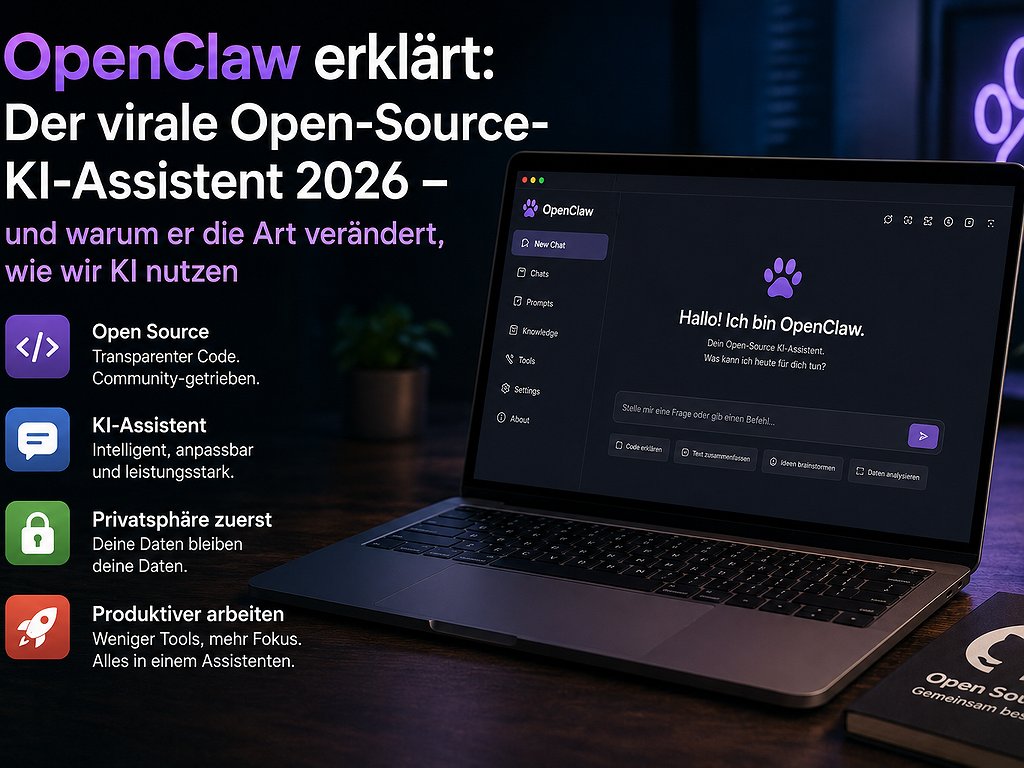
2026 has brought a new star to the AI world: OpenClaw. Not another chat interface, not a frontend for a language model, but something fundamentally different: an open-source AI assistant that you run on your own computer and communicates with you via WhatsApp, Telegram, Slack, Discord, or iMessage. It handles tasks on your computer, executes commands, manages files, controls your browser, and has a memory that grows 24 hours a day.
Within a few weeks, OpenClaw has gathered over 68,000 stars on GitHub and is celebrated on X as "the future that's already here". But is this just another hype, or does OpenClaw actually change the way we work with AI? And more importantly: is it worth it for you as a learner or professional in the DACH region? This article gives you an honest, practical answer.
1. What is OpenClaw - in plain terms?
OpenClaw is an open-source project started by Peter Steinberger - the founder of PSPDFKit, one of the most well-known Austrian software companies in the enterprise sector. The project has an official nickname: "Molty", the friendly space-humming 🦞. This may sound silly, but it reflects a community culture that strongly differs from polished, corporate AI products.
Technically speaking, OpenClaw is a gateway - a bridge between three worlds:
- Messaging apps you already use: WhatsApp, Telegram, Slack, Discord, iMessage, Signal, Microsoft Teams, and many more.
- AI models of your choice: Claude, ChatGPT, Gemini, or locally running models over Ollama.
- Your real data and tools: files on your hard drive, your calendar, your notes (Apple Notes, Obsidian, Notion), your browser, your development environment.
The big difference from ChatGPT or Claude in the browser: OpenClaw runs on your computer. Your data stays local. You bring your own API key or use local models. No cloud provider between you and your tasks.
2. What makes OpenClaw different?
Three things fundamentally distinguish OpenClaw from classical AI chatbots:
a) It comes to you - not you to it
Instead of opening a website, starting an app, or activating an extension, you talk to your assistant where you're already at: in WhatsApp with friends, in Slack with your team, in Discord with your community. Send a message to your bot, and the work starts.
b) It can actually do things
A traditional chatbot responds with text. OpenClaw can execute terminal commands, read and write files, fill out forms in your browser, edit GitHub issues, update your calendar, send emails. A user puts it this way: "A smart model with eyes and hands at a desk with keyboard and mouse."
c) It has a persistent memory
OpenClaw stores context in local Markdown files on your computer. That means: what you planned last week, it still knows. What project you're working on, it still knows. This is a fundamental difference from classical chatbots, whose "memory" disappears with the end of the session or is curated by a cloud provider.
d) It's Open Source
=== ÜBERSetzter HTML ===The complete code is publicly available on GitHub. You can check what the assistant does. You can modify it. You can build and share new „AgentSkills" (abilities) with the community. Over 100 pre-configured AgentSkills are already available – from shell commands to file system management and web automation.
3. What you can do with it
It sounds exciting, but what do you really need it for? Here are concrete use cases that are already being shared in the community:
For Students and Learners
- Structure your exam preparation: „Send me the three most important topics from my exam plan to review every morning at 8 am." OpenClaw sets up the reminder, accesses your notes, and sends them to WhatsApp.
- Learn a language in the chat: „Send me 10 vocabulary questions from my Anki list when I brush my teeth in the morning." A permanent language coach in your phone.
- Synchronize your notes: Regardless of whether it's Obsidian, Notion, or Apple Notes – OpenClaw can access and manage all three, summarizing or linking content.
For Professionals and Freelancers
- Triangulate and summarize your emails: Get an overview of the 30 most important emails from the night in a Slack message every morning.
- Automate meeting preparation: „Prepare me for my 2 pm meeting: Who are the participants, what was it about last time, and what open points are there?"
- Monitor the market in the background: A cron job that checks your most important competitor websites daily at 6 am and sends you a message if there are any changes.
For Developers and Tech Enthusiasts
- GitHub automation: A webhook triggers OpenClaw when a Sentry error occurs, Claude analyzes the problem, opens a pull request – while you sleep.
- Debugging workflows: Send error messages to WhatsApp, OpenClaw analyzes logs, suggests fixes, and applies them for testing.
- Codebase management: „Summarize for me what was merged in our frontend repository this week and which API changes could break things."
Praxis-Block: The honest reality check – is OpenClaw something for you?
Before you dive in, be honest with yourself. OpenClaw is currently extremely hyped – but not suitable for everyone. Check these five points:
- Are you technically proficient? The installation requires Node.js version 24.15, a terminal, API keys, and about 30-60 minutes of setup. If you get nervous when you hear the word „terminal," wait for simpler frontends or use ChatGPT/Claude directly.
- Do you really have repetitive tasks to automate? The value comes from automation. If you don't have recurring tasks, a regular chatbot is sufficient.
- Is data protection important to you? If you work professionally with sensitive data (law firm, practice, enterprise consulting), local execution of OpenClaw is a real advantage.
- Are you willing to invest in a young project? The project is a few months old. It's developing rapidly, but it also has corners and edges. Those who need stability should wait 6-12 months.
- Do you really want a personal AI agent – or just a better chat? OpenClaw unfolds its potential when you use it as an agent that acts independently. Those who only want to ask classical questions don't need this.
Short: If you answer yes to three or more of the following points, OpenClaw is worth a serious look.
4. How to get started with OpenClaw
If you've decided: The official way is uncomplicated if you have basic terminal knowledge.
- Check requirements: You need Node.js version 24.15 (or LTS 22.22.3+) and an API key from a KI provider of your choice (Anthropic Claude, OpenAI, Google Gemini) – or alternatively a local Ollama installation.
- Clone repository: Get the project from github.com/openclaw/openclaw to your computer.
- Start onboarding: The command
openclaw onboardwill guide you through setting up Gateway, Workspace, Channels, and Skills. - Connect first channel: The easiest way is Telegram or Discord. WhatsApp is a bit more challenging due to API rules.
- Add first Skill: Start small. For example: „Send me the weather for Vienna and my first three appointments every morning at 8 am."
The official documentation on docs.openclaw.ai is well-maintained, but growing – be prepared to search on Google and Discord for issues.
5. Why OpenClaw is relevant for your learning
Even if you don't install OpenClaw yourself, it's worth understanding the project. It's a signal for a larger trend that will shape the workforce and learning in 2026: From chatbots to agents.
Until 2024, AI was mostly something you spoke to. From 2026 on, AI will increasingly be something that acts for you – ideally independently, in the background, with access to your real data and tools. Those who understand this shift can position themselves early:
- As a user: Those who master agent workflows will save 5–15 hours per week compared to traditional AI usage.
- As a professional: „AI Agent Builder" and „AI Workflow Designer" are two of the fastest-growing job titles in 2026, according to LinkedIn.
- As a learner: Those who understand the principles behind OpenClaw – Gateways, Skills, persistent memory, triggers – have an unfair advantage over people who are still stuck at „write me an email."
6. Conclusion: A glimpse into the near future
OpenClaw won't be the only solution of its kind – but it's an early and visible representative of a new category. Over the next 12 to 24 months, we'll see similar approaches being integrated into enterprise software, operating systems (Apple Intelligence, Windows Copilot+), and consumer products. Those who understand OpenClaw today will see the near future of personal AI usage.
Do you need to install OpenClaw yourself? No. But the question it raises, you should ask yourself: Which recurring tasks in my daily life could be taken over by agents – and which Skills do I need to build to build, run, and monitor such agents?
That's where Skill Tandem comes in. If you want to use KI agents effectively, you need more than just tool knowledge: structured thinking, clear communication, domain expertise. On our platform, you'll find learning partners and mentors who will support you – whether you want to deepen prompt engineering, get into automation, or expand your professional foundations. Learning in tandem accelerates exactly these future Skills. Register for free now and start with a learning partner!
=== ÜBERSetzter HTML ===FAQ: Frequently Asked Questions about OpenClaw
Is OpenClaw free?
The project itself is open-source and free to use. Costs are indirect: You need a API key (Anthropic Claude, OpenAI, Gemini) with typical costs of 10 to 100 euros per month depending on usage. Alternatively, you can use local models completely free via Ollama - but you'll need a powerful computer.
Is OpenClaw safe?
Yes, in general, because you have control over your data. But: A KI agent that can execute shell commands can also cause damage if you give it too many rights or install a faulty Skill. Start with limited rights and expand step by step.
Can I use OpenClaw as a non-developer?
Currently (mid-2026), the target group is clearly technical. For users without terminal experience, there will probably be simpler ways in the next 6-12 months - for example, hosted versions or GUI frontends. Until then, the learning curve is steep.
How does OpenClaw differ from ChatGPT agents or Claude Skills?
Classic chatbot agents run in the provider's cloud. OpenClaw runs on your own computer. This means: more data protection, more control, but also more responsibility and more setup effort. An important difference for enterprise environments with compliance requirements.
What alternatives are there to OpenClaw?
For cloud-based agent workflows: the agent functions of ChatGPT, Claude Sonnet Skills, Google Gemini Agentic Mode. For local, open alternatives: Simon Willison's LLM, AutoGPT, LangGraph, or simpler script-based approaches with n8n or Zapier. OpenClaw stands out through the combination of chat app integration, local operation, and open community.
How do I best learn to build KI agents?
Start small, try a lot, and exchange with others. A Tandem partner on Skill Tandem who is also getting started in KI automation accelerates the learning curve significantly - you can show each other skills and workflows, discuss errors, and make progress faster than alone.


Ich hab OpenClaw auch schon auf meinem Rechner laufen lassen, funktioniert super, kann auch empfehlen, die Anleitung auf der GitHub-Seite zu lesen, hilft bei der Einrichtung!